
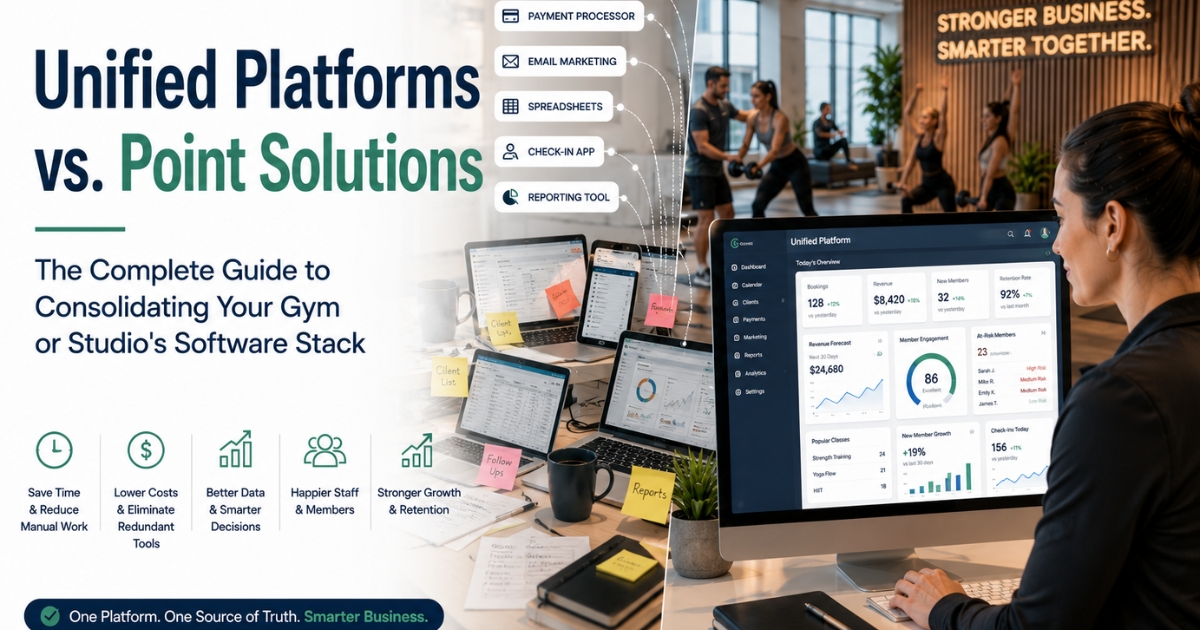
Unified Platform vs. Point Solutions: The Complete Guide to Consolidating Your Gym or Studio's Software Stack
Why a Unified Gym Platform Is Replacing Point Solutions
Most fitness businesses don't plan their software stack. It just grows.
One tool for booking. Another for payments. A third for marketing emails. A spreadsheet for leads. A separate app for check-ins. Another tool just for reports.
Each tool made sense on its own. But together, they create a mess. This is called software sprawl. It costs you time and money.
That's why more gyms and studios are switching to a unified platform. A unified gym platform brings every function into one system.
Businesses that switch to a unified platform often report:
- 60–70% less time spent on manual data entry
- 15–25% lower total software spending
- More accurate reports (data lives in one place)
- A better staff experience (one login, not five)
- A smoother client experience (no confusing gaps between tools)
(Results vary by business. These are commonly reported ranges, not guarantees.)
This guide covers:
- When a unified platform makes sense
- How to evaluate one
- How to switch without disrupting your business
The Software Sprawl Problem
How Fragmentation Happens
Most gyms build their software stack piece by piece:
- Year 1: A basic booking tool
- Year 1.5: A separate payment processor (the booking tool's payments were limited)
- Year 2: An email marketing tool (the booking tool's marketing was weak)
- Year 2.5: A spreadsheet or CRM for leads (nothing else tracked prospects well)
- Year 3: A separate check-in app (the main system's check-in was clunky)
- Year 3.5: A reporting tool (none of the above gave real business insight)
By year three or four, many gyms run 5–8 disconnected tools. None of them talk to each other.
The Hidden Costs of Fragmentation
Cost 1: Duplicate Data Entry Staff type the same client details into multiple systems. Once for booking. Again for the CRM. Again for email marketing. Time cost: often 5–10 hours a week for a mid-size studio.
Cost 2: Data Inconsistency Systems don't sync. A client updates their email in one place, not another. Membership status shows differently across tools. Cost: errors, confused clients, and wasted staff time fixing mistakes.
Cost 3: Incomplete Reporting Your data lives in different systems. Getting one clear business picture means pulling numbers from each tool by hand. Cost: slow, error-prone reporting and delayed decisions.
Cost 4: Redundant Software Spending Several point solutions often cost more together than one unified platform. Each tool has its own fee. Many features overlap. Cost: often 15–30% higher total spend than a consolidated alternative.
Cost 5: Staff Training Burden New hires must learn 5–8 systems instead of one. Onboarding takes longer. Mistakes are more likely early on. Cost: often 2–3x longer onboarding time.
Cost 6: Poor Client Experience Clients may book in one app, pay in another, and get messages from a third. It feels disjointed and unprofessional. Cost: lower client satisfaction, and possible impact on retention.
What "Unified Platform" Actually Means
Core definition: A unified platform brings multiple business functions into one system, with one shared database. No separate tools. No manual data transfers. No fragile integrations holding things together.
Key Functions a True Unified Platform Should Handle
1. Scheduling & Booking
- Class and appointment scheduling
- Online booking for clients
- Waitlist management
- Staff scheduling
2. Payment Processing
- Membership billing
- Class package sales
- Point-of-sale for retail and drop-ins
- Payment plan management
3. Member/Client Management (CRM)
- Client profiles and history
- Membership status and type
- Communication history
- Lead tracking, not just active clients
4. Marketing & Communication
- Email marketing
- SMS and text messaging
- Automated message sequences
- Client segmentation for targeted messages
5. Reporting & Business Intelligence
- Revenue reporting and forecasting
- Attendance and utilization reporting
- Member retention and churn analytics
- Staff performance reporting
6. Check-In & Access
- Member check-in (kiosk, app, or front desk)
- Access control integration, if needed
- Attendance tracking
What Makes It "Unified" vs. Just "Many Features"
Having lots of features isn't the same as being unified. The real difference is one shared database behind everything.
When a client updates their email, it updates everywhere. When a payment goes through, it instantly shows up in reporting, membership status, and communication history. No manual syncing. No separate logins.
What a Modern AI-Powered Unified Platform Looks Like
Consolidation used to mean one thing: fewer logins. That's still true. But it's no longer the whole story.
The newest unified platforms don't just store your data. They read it, understand it, and help you act on it. Instead of one system that just holds your data, you get one system that understands how it all connects.
Platforms like Fitzpot combine unified operations with AI Membership Intelligence, Revenue Intelligence, Wellness Intelligence, and Predictive Analytics — all in one platform.
Here's what that looks like in practice:
AI Membership Intelligence Instead of a static member list, the platform constantly reads usage patterns, engagement trends, and plan fit. You see who's thriving and who's quietly drifting away — before they cancel.
AI Wellness Companion Every member gets automatic, ongoing support. Check-in prompts. Progress nudges. Personal guidance. None of it adds work to your staff's day.
AI Recommendation Engine The platform suggests the next best step for each member — a class, an upgrade, a re-engagement offer — based on their real history, not a generic template.
Relationship Health Score Every member relationship gets one simple, trackable score. It shows how engaged and satisfied they are right now. Staff know exactly who needs attention today.
Individual Wellness Score Members see their own progress too. A simple, ongoing measure of how their fitness journey is going.
Predictive Analytics Instead of learning a member churned after it happens, Predictive Analytics flags at-risk members, slowing engagement, and revenue dips early — before they become a problem.
Revenue Intelligence Traditional reports tell you what happened. Revenue Intelligence tells you why it happened, and what's likely next. It forecasts revenue, flags churn risk, predicts attendance, and recommends pricing or campaign timing.
Corporate Dashboard Multi-location operators and corporate wellness partners get one dashboard. It rolls up performance across every site. No stitching together separate reports.
Here's the real distinction: a unified platform gives you one place to manage your business. An AI-powered unified platform gives you one place that also helps you run it better.
Unified Platform vs. Point Solutions: When Each Makes Sense
When Point Solutions (Separate Best-in-Class Tools) Make Sense
Scenario 1: You Have Highly Specialized Needs If you need one truly best-in-class tool for a single function — like advanced email automation — a specialized point solution might outperform a unified platform's built-in version.
Scenario 2: You're Very Early Stage Brand-new, very small businesses sometimes do better starting with free or low-cost point solutions. It's often smarter than committing to a full unified platform before you have a proven model.
Scenario 3: You Have Unique Technical Requirements Unusual technical needs — custom integrations, strict compliance rules — sometimes call for picking individual best-fit tools instead of a unified platform's built-in capabilities.
When Unified Platforms Make Sense (Most Common Scenario)
Scenario 1: You're Feeling Software Sprawl Pain Running 4+ disconnected tools? Duplicate entry, inconsistent data, incomplete reports? Consolidation usually delivers real value here.
Scenario 2: You're Scaling As you grow, the overhead of juggling separate systems grows even faster. What worked at 100 clients can break down at 500+.
Scenario 3: You Want Better Business Intelligence If your data is scattered and hard to use for decisions, a unified platform's built-in Business Intelligence gives you far better visibility — not just what happened last month, but why, and what's coming.
Scenario 4: You're Managing Multiple Locations Multi-location businesses benefit the most. Centralized, consistent reporting across sites gets exponentially harder with fragmented tools. A Corporate Dashboard removes the manual stitching entirely.
Scenario 5: Staff Efficiency Is a Priority If staff time is a real constraint, the efficiency of one unified workflow — instead of juggling several tools — often justifies the switch.
How to Evaluate Unified Platforms
Step 1: Audit Your Current Software Stack
- List every tool you currently use
- Write down what each tool does
- Add up your total monthly and yearly spend
- Note your biggest pain points
- Note any features you'd hate to lose
Step 2: Define Your Must-Have Unified Features
- Which functions matter most to consolidate first?
- Which current features are non-negotiable to keep?
- Are any of your needs too specialized for a general platform?
Step 3: Weigh Depth vs. Breadth Unified platforms cover many functions. That can mean some trade-offs versus the single best specialized tool in one category.
Ask this for each function: "Does this platform's version of [feature] meet my needs — even if it's not the single best tool on the market for just that feature?"
Step 4: Calculate the True Total Cost
Current fragmented stack:
- Add up all your current tool subscriptions
- Add the estimated cost of staff time spent on manual data entry and fixing errors
Unified platform:
- Platform subscription cost
- One-time migration and setup costs
- Any specialized point solutions you'll still need
Step 5: Check Integration Quality for Remaining Tools Even with a unified platform, you might keep 1–2 specialized tools. Check:
- Does the platform have solid API and integration options?
- Are there pre-built integrations for your remaining tools?
Step 6: Request a Full Demo Ask to see:
- How data flows between different functions, not just isolated features
- Real Business Intelligence output — forecasts, churn flags, revenue predictions — not just historical charts
- The actual client experience across booking, payment, and messaging
Step 7: Talk to Customers Who Switched Find reference customers who moved from a fragmented, multi-tool setup to this platform — not just customers who started fresh with it. Their experience is the most relevant to yours.
Top Considerations for Fitness-Specific Unified Platforms
Consideration 1: Fitness-Specific vs. General Business Platforms Some unified platforms are built specifically for fitness and wellness — class-based scheduling, membership models, and more. Others are general business tools adapted for fitness.
Fitness-specific platforms usually handle industry details better: recurring membership billing, class waitlists, instructor scheduling.
Consideration 2: Scalability for Growth Planning to grow — more locations, staff, or clients? Check that the platform scales smoothly, both in pricing and real performance.
Consideration 3: Mobile Experience A good unified platform needs a strong mobile experience for:
- Staff — managing schedules, checking in clients, taking payments on the go
- Clients — booking, checking membership status, messaging
Consideration 4: Business Intelligence Depth The real value of unification is better decisions, not just cleaner charts. Traditional reporting shows what happened. Business Intelligence explains why, and predicts what's next. Confirm the platform actually forecasts trends and flags risk, not just logs transactions.
Consideration 5: Customization and Flexibility Check that the platform fits your actual business model — drop-in classes, memberships, personal training packages, retail, multiple locations — without awkward workarounds.
Migration Strategy: Consolidating From Multiple Tools
Phase 1: Planning (2–3 weeks)
- Complete your software audit
- Select your unified platform
- Map out which tools you'll replace vs. keep
- Build a migration timeline and assign owners
Phase 2: Data Consolidation Planning (2–3 weeks) Often the hardest part, since you're merging data from several disconnected sources:
- Identify what data lives in each tool (contacts, payment history, messages)
- Plan how to merge and deduplicate inconsistent data
- Decide what historical data to migrate vs. archive separately
Phase 3: Platform Configuration (2–4 weeks)
- Set up the platform to match your business model
- Configure integrations for any remaining point solutions
- Build automated workflows to replace old manual processes
Phase 4: Staff Training (1–2 weeks)
- Train staff on the new unified workflow
- Focus on the efficiency gains, not just "here's a new system." Show staff how it makes their job easier.
Phase 5: Phased Cutover (2–4 weeks) A phased rollout is safer than switching everything at once:
- Week 1: Migrate scheduling and booking
- Week 2: Migrate payment processing
- Week 3: Migrate CRM and client management
- Week 4: Migrate marketing and communication
Phase 6: Decommission Old Tools Once you're fully confident in the new platform — usually 30–60 days after migration — cancel your old subscriptions.
Total realistic timeline: 10–16 weeks, from decision to full consolidation.
Common Unified Platform Mistakes
Mistake 1: Rushing the Migration Skipping proper data planning can mean lost or corrupted data, and a chaotic transition. Fix: Follow a structured, phased plan instead of flipping the switch all at once.
Mistake 2: Assuming Feature Parity Don't assume the new platform's features work exactly like your old tools without testing them. Fix: Test each function during your trial. Compare it directly against your current tools.
Mistake 3: Skipping Staff Input Choosing a platform without asking the staff who'll use it daily. Fix: Include frontline staff in the evaluation. Their hands-on feedback catches issues leadership might miss.
Mistake 4: Underestimating Migration Complexity Assuming data migration will be quick and easy. Merging data from multiple sources often reveals messy inconsistencies. Fix: Budget more time than you think you'll need for data cleanup.
Mistake 5: Not Explaining the "Why" to Staff Rolling out a new system without explaining the benefits leads to resistance and slow adoption. Fix: Clearly explain the wins — less duplicate entry, one login instead of five, an easier daily workflow.
Mistake 6: Canceling Old Tools Too Soon Dropping all your old tools the moment you "go live," with no safety net. Fix: Keep access to old systems for 30–60 days after migration, just in case.
ROI of Unified Platform Consolidation
Example: Mid-Size Studio Cost Comparison
Fragmented stack (before):
- Booking and scheduling tool: $80/month
- Separate payment processing fee: $50/month
- Email marketing tool: $40/month
- CRM or lead tracking tool: $60/month
- Reporting add-on: $30/month
- Total: $260/month = $3,120/year
Plus hidden costs:
- Duplicate data entry: ~6 hours/week × $25/hour × 52 weeks = $7,800/year
- Fixing data inconsistencies: ~2 hours/week × $25/hour × 52 weeks = $2,600/year
Total true cost of a fragmented stack: $13,520/year
Unified platform (after):
- Platform subscription: $200/month = $2,400/year
- Time saved on admin: ~7 hours/week, worth roughly $9,100/year in redirected staff time
Total direct cost: $2,400/year — a $720/year saving on subscriptions alone Plus ~$9,100/year in staff time freed up Combined value impact: roughly $10,000+/year
(These are illustrative example figures for a typical mid-size studio, not guaranteed results for every business.)
Other benefits, harder to put a number on:
- Better data accuracy, better decisions
- A more consistent client experience
- Faster staff onboarding — one system, not five
- Revenue Intelligence often surfaces upsell and retention opportunities manual reporting simply misses
Conclusion
Software sprawl — building up multiple disconnected tools over time — is one of the most common, costly problems in fitness businesses today.
A unified platform solves this by bringing your core business functions into one system, with one shared database. That typically means:
- 15–25% lower direct software spending
- 60–70% less time spent on duplicate data entry
- Far more accurate reporting and Business Intelligence
- A better experience for both staff and clients
But consolidation is only half the opportunity. The businesses seeing the biggest gains aren't just moving to one platform. They're moving to one intelligent platform — where AI Membership Intelligence, an AI Wellness Companion, Predictive Analytics, and Revenue Intelligence work in the background, turning your data into decisions, not just dashboards.
Evaluate your unified platform opportunity this year:
- Audit your current software stack and calculate the true total cost, including hidden staff time
- Define your must-have unified features
- Compare 2–3 unified platform candidates side by side
- Plan a phased migration (10–16 weeks is realistic)
- Keep your old systems briefly as a safety net during the switch
Whether you need full consolidation or a hybrid approach — one unified core plus a few specialized tools — this framework helps you make a deliberate choice. Not just more software sprawl by default.